![LaserStar Technologoes Logo-01.png]](https://26739.fs1.hubspotusercontent-na1.net/hub/26739/hubfs/LaserStar%20Technologoes%20Logo-01.png?height=40&name=LaserStar%20Technologoes%20Logo-01.png)
Disclaimer: The procedures described herein should be performed only by or under the supervision of specialized technicians. LaserStar is not responsible for damage to parts, equipment, or persons who attempt to perform any of these procedures without proper supervision or technical assistance, proper tools, or the safety measures necessary for handling lasers and high- and low-voltage equipment.
First, make sure the gas is turned on. Follow the instructions below.
G3 Lasers
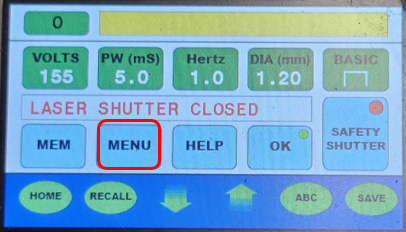
1. On the main screen, select "Menu"
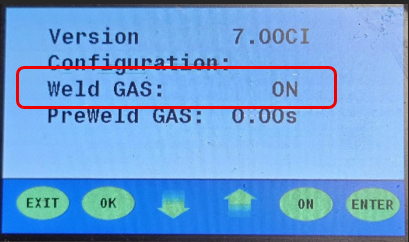
2. Make sure the gas is "ON"
G4 – G5 Lasers
3. On the main screen, select "Menu"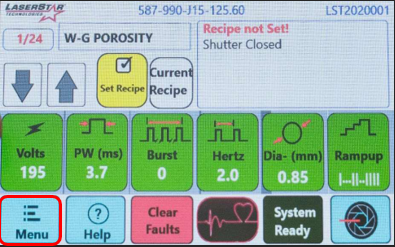
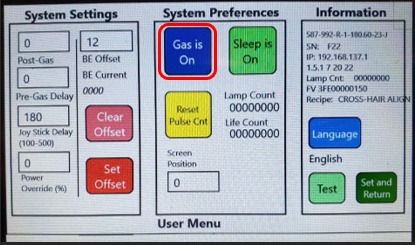
4. Select “Utility Menu”
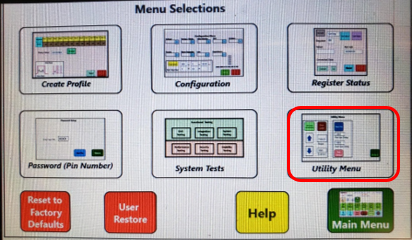
5. Make sure the "Gas" is on. If it isn't, turn it on. Then press "Set and Return" to go back to the previous screen and save your changes.
6. If the gas is turned on but is not flowing, test if the gas is releasing. Use the Jumper with the LED from the Troubleshooting Kit
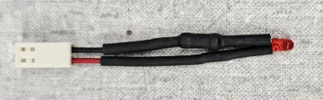
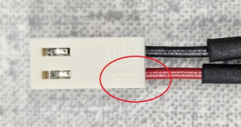
7. Before using it, Make sure the jumper cables are properly connected. The red cable should be on PIN 1
8. Turn “OFF” the Laser
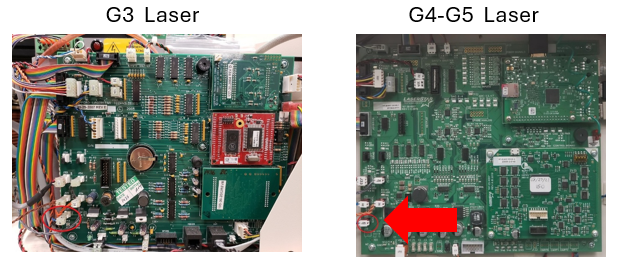
9. Remove the side panel where the Control Board is located
10. On the control board at location J25, disconnect the cable and insert the jumper between the two pins.
11. Turn on the laser and press the foot switch. Confirm that the jumper's LED lights up. If the LED on the jumper does not light, the control board needs to be replaced.
12. Test the Foot Switch for continuity if the Jumper LED does not turn on. Disconnect the Foot Switch from the Laser
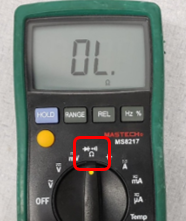
13. Use a voltmeter. Select Ohms to measure continuity.
14. Take the foot switch connector. Identify pins 1, 2, and 3 inside connector. PIN 1 is common
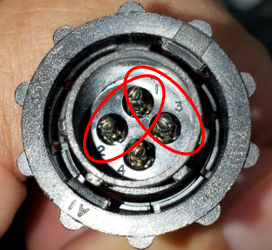
15. Press the foot switch and, using the voltmeter probes, check for continuity between 1 and 2. Pins 1 and 2 are for the gas. There should be continuity when pressing the foot switch between the pins. The foot switch's first stage controls the gas, and the second stage activates the laser.
After confirming the previous steps, the gas is still not flowing; replace the gas solenoid.
See also the article "Adjusting Fixed Argon Nozzle"