![LaserStar Technologoes Logo-01.png]](https://26739.fs1.hubspotusercontent-na1.net/hub/26739/hubfs/LaserStar%20Technologoes%20Logo-01.png?height=40&name=LaserStar%20Technologoes%20Logo-01.png)
Disclaimer: The procedures described herein should be performed only by or under the supervision of specialized technicians. LaserStar is not responsible for damage to parts, equipment, or persons who attempt to perform any of these procedures without proper supervision or technical assistance, proper tools, or the safety measures necessary for handling lasers and high- and low-voltage equipment.
The Cap Discharge Board discharges the capacitors when the foot switch is pressed, firing the lamp. Also, when the Laser is turned off, it detects the absence of 24VDC and discharges the capacitors as a safety measure. During capacitor discharge, the LED on the Flash Lamp Power Unit remains on throughout the discharge. This procedure is only for ND:YAG Lasers. This procedure is only for G1, G2, and G3 lasers. It does not apply to newer generations.
To diagnose the cause of the "Cap Discharge FLT" error message, follow these steps:
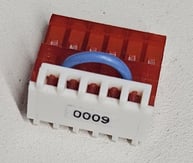
Discard the Control Board: This should be the first step to execute. For this, use the Jumper J6000 in the Troubleshooting Kit to close the circuit at J23 on the Control Board.
Before using the jumper, check that the jumper is between PIN 2 and 5
6000 Jumper
G1, G2, and G3 Control Board
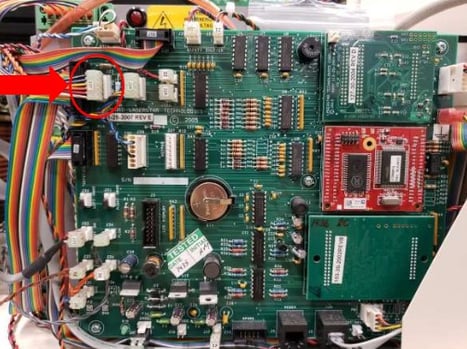
Turn on the Laser and check that the message is no longer there. If the message continues, the problem is the Control Board and must be replaced. For a new control board, you must contact service.
If the message stops appearing, the discharge board may be damaged and needs to be replaced. The replacement of the Discharge Board can only be performed by LaserStar Technical Staff at the service center.
We suggest you look at the following articles:
-
If your Laser is a Benchtop, Removing the Flash Lamp Power Unit iWeld Benchtop
- If your Laser is a Pedestal, Removing the Flahs Lamp Power Unit from iWeld Pedestal
Was This Article Helpful?
Take our survey and let us know your feedback.
Still Need Help?
If you need our assistance with your issue, please contact our customer support team at (1) 888-LST-SRVC (578-7782) Menu Option 3. If you're looking for support outside of our regular business hours, please leave a voice message or send an email at service@laserstar.net