![LaserStar Technologoes Logo-01.png]](https://26739.fs1.hubspotusercontent-na1.net/hub/26739/hubfs/LaserStar%20Technologoes%20Logo-01.png?height=40&name=LaserStar%20Technologoes%20Logo-01.png)
Disclaimer: The procedures described herein should be performed only by or under the supervision of specialized technicians. LaserStar is not responsible for damage to parts, equipment, or persons attempting to perform any of these procedures without proper supervision or technical assistance, proper tools, or safety measures necessary for laser, high, and low voltage handling.
Tools:
- Philips head screwdriver
- 3 volt battery (BR2325 or CR2325 only)
Locate the Control card, as shown in the image below. Depending on your system, the board will be located behind either the left or right panel.
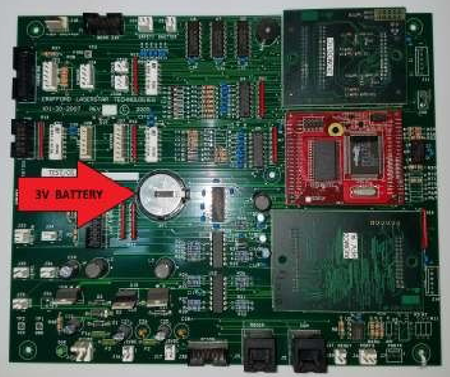
Steps:
- Turn the system on
- Remove the dead battery
- Install the new battery
- Turn the system off and then back on
NOTE:
Installing the battery with the system turned all the way on will allow you to keep any custom settings you have saved. If the battery is entirely dead or was installed with the system turned off, then any custom settings will be lost, and only the factory default settings will remain.
If the “Dead Battery” message still appears after restarting the system a few times, turn the system on and remove the battery. Test the battery with a voltmeter set to DC voltage. The battery must be 3 volts. If the battery voltage is below 3 V, it will not work.