![LaserStar Technologoes Logo-01.png]](https://26739.fs1.hubspotusercontent-na1.net/hub/26739/hubfs/LaserStar%20Technologoes%20Logo-01.png?height=40&name=LaserStar%20Technologoes%20Logo-01.png)
Tools:
Allen key wrench 2.5 mm
Background information: In the Microscope Mounting Ring, some screws should never be touched without technical assistance.
To remove or install the Microscope mounting ring, loosen the Allen screws in the holes shown in the image below. To do this, use a 2.5 mm Allen key wrench.
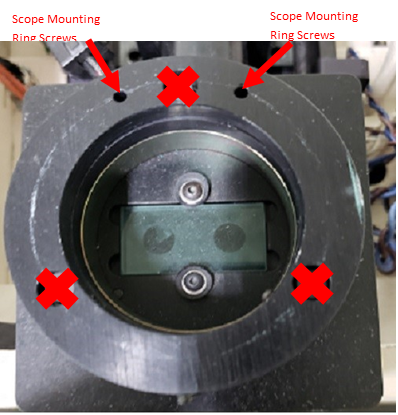
Screws marked with a red "X" should never be tightened or removed. These screws are factory calibrated, and if they are adjusted, the mounting ring loses its calibration, so the cross-hair alignment will not be possible.
We suggest you also see the article "Adjusting Microscope Cross-Hair".