![LaserStar Technologoes Logo-01.png]](https://26739.fs1.hubspotusercontent-na1.net/hub/26739/hubfs/LaserStar%20Technologoes%20Logo-01.png?height=40&name=LaserStar%20Technologoes%20Logo-01.png)
Disclaimer: The procedures described herein should be performed only by or under the supervision of specialized technicians. LaserStar is not responsible for damage to parts, equipment, or persons who attempt to perform any of these procedures without proper supervision or technical assistance, proper tools, or the safety measures necessary for handling lasers and high- and low-voltage equipment.
If, after changing the water and filter on a benchtop G3, G4, or G5 laser, the "Over Voltage" message appears, the J22 cable may have been accidentally disconnected from the control board during part replacement. The message appears because the controller receives no response from the Cap Charger.
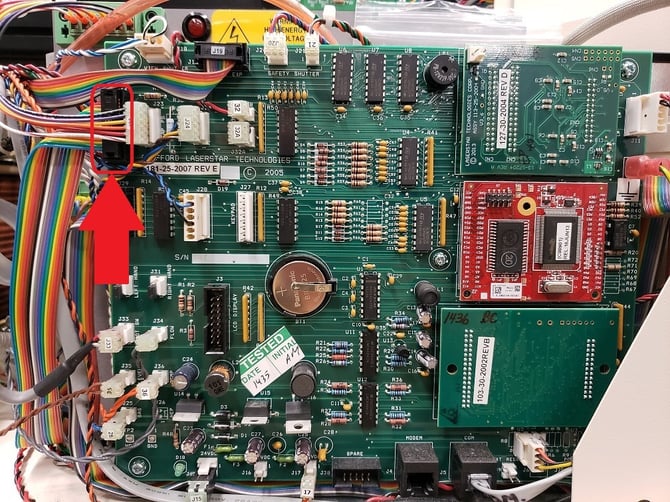
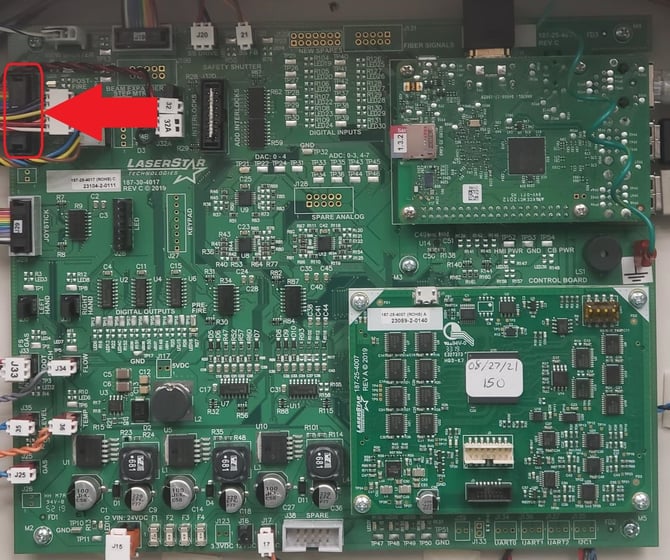
Turn off the laser and check that the J22 cable is correctly connected to the control board. J22 is the multi-colored or gray flat cable.
G1, G2, G3 Control Board
G4, G5 Control Board
If you found the cable partially disconnected, push it to reconnect it, then turn on the laser and check whether the error no longer appears. If the message still appears, technical assistance will be required. Contact Service for more help