![LaserStar Technologoes Logo-01.png]](https://26739.fs1.hubspotusercontent-na1.net/hub/26739/hubfs/LaserStar%20Technologoes%20Logo-01.png?height=40&name=LaserStar%20Technologoes%20Logo-01.png)
Disclaimer: The procedures described herein should be performed only by or under the supervision of specialized technicians. LaserStar is not responsible for damage to parts, equipment, or persons who attempt to perform any of these procedures without proper supervision or technical assistance, proper tools, or the safety measures necessary for handling lasers and high- and low-voltage equipment.
The Control Board communicates with several input devices, including the Joystick, Keypad, and Footswitch. These devices send user commands to the Control Board. When the error message “Joystick(s) Stuck” appears, it indicates a possible issue with the Joystick. To isolate the source of the problem, disconnect the Joystick from the Control Board at connector J29.
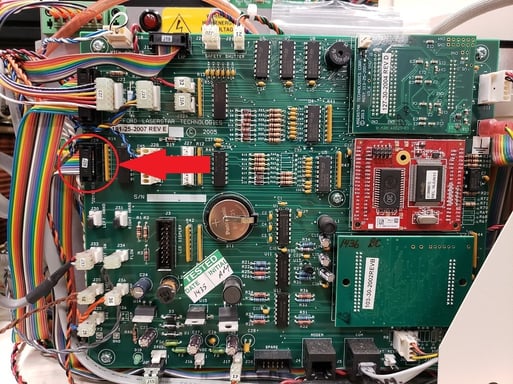
Turn on the Laser and check if the error no longer appears. If the error no longer
appears, the Joystick must be changed.
If the error continues to appear, rule out the Control Board as the Cause. A new Control Board is needed
Was This Article Helpful?
Take our survey and let us know your feedback.
Still Need Help?
If you need our assistance with your issue, please contact our customer support team at (1) 888-LST-SRVC (578-7782). If you're looking for support outside of our regular business hours, please leave a voice message or send an email at service@laserstar.net