![LaserStar Technologoes Logo-01.png]](https://26739.fs1.hubspotusercontent-na1.net/hub/26739/hubfs/LaserStar%20Technologoes%20Logo-01.png?height=40&name=LaserStar%20Technologoes%20Logo-01.png)
Disclaimer: The procedures described herein should be performed only by or under the supervision of specialized technicians. LaserStar is not responsible for damage to parts, equipment, or persons attempting to perform any of these procedures without proper supervision or technical assistance, proper tools, or safety measures necessary for laser, high, and low voltage handling.
This error message may be caused by two reasons:
- Keypad Problems
- Control Board Problems
To rule out the cause, you must follow the following steps:
- Turn off the laser and remove the side panel where the control board is located.
- Once you have access to the Control Board, locate the cable labeled J27 and disconnect it.
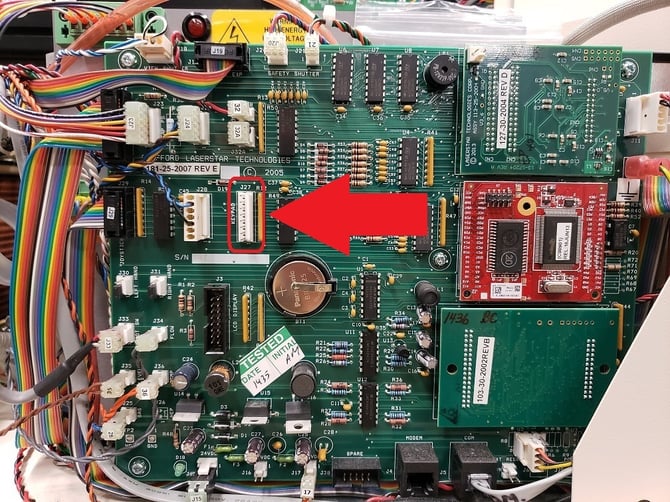
3. Turn on the laser and check whether the message appears or not.
If the message does not appear, the problem lies with the keypad's membrane switch, and it must be replaced. Conversely, if the message persists, the control board may be defective. You will need to contact Service.
If the problem lies with the Keypad, do not reconnect J27 to the Control Board. You can continue operating the laser using the joysticks while you await the replacement. Once you have received and replaced the membrane switch, you may reconnect J27.