![LaserStar Technologoes Logo-01.png]](https://26739.fs1.hubspotusercontent-na1.net/hub/26739/hubfs/LaserStar%20Technologoes%20Logo-01.png?height=40&name=LaserStar%20Technologoes%20Logo-01.png)
Limitation of Liability for Equipment Damage
Customers are advised that LaserStar does not cover any damage to a Laser, Flash Lamp Power Unit, Rail, Motion Device, or related components during shipping caused by improper packaging. All equipment and components sent for repair must be packaged appropriately to prevent damage in transit. Failure to do so may result in denial of responsibility for any resulting damages.
The following recommendations apply when sending a Laser, Rail, Flash Lamp Power Unit, or motion device to LaserStar for evaluation and repair.
If you are sending a laser, you should follow these recommendations:
1. Drain water from the system. Loosen the screws on the upper lamp chamber to allow water to flow down into the water container. Then drain the water from the water container. If you are shipping the Laser during cold weather, you must completely flush the water from the system. You can find information on how to do this at the following links:
Flushing the system on a 99X series benchtop unit
Flushing the system on a 97X series pedestal unit
2. Remove the microscope. Laserstar does not need a microscope to repair your laser. Remove it and keep it until your Laser is returned.
3. Remove all personal tools that are in the work chamber
4. Remove the key and the Interlock on the back of the Laser to prevent it from breaking during transport
If it is a rail, flash lamp power unit, or motion device, we recommend shipping it using a freight account. We suggest doing the following:
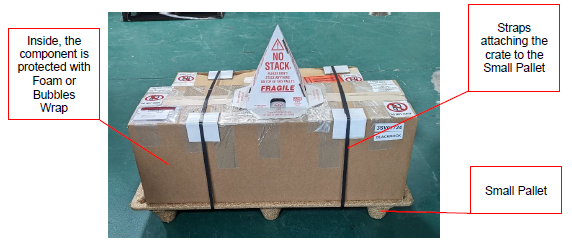
1. Place foam or bubble wrap around the part to be shipped to protect it from impact.
2. Place the crate on a small pallet and secure it with straps. (See example in the photo below).
If you are sending a Motion Device for evaluation, the following components must be sent:
1. Motion Device Axis System
2. All the harnesses between the axis and the control box
3. MotionFX Control Box
4. If the Motion System uses a laptop, it must be shipped
5. On the laptop, there should be an example of the process that Laserstar can use as a test.
Ask your shipping provider how they can help you prepare your cargo to minimize additional repair costs. Your service provider can advise and help you with packaging.
If you prefer, Laserstar can supply you with crates and shipping for a Laser, Rail, Flash Lamp Power Unit, or Motion Device. Ask the Technician assisting you for a quote.