![LaserStar Technologoes Logo-01.png]](https://26739.fs1.hubspotusercontent-na1.net/hub/26739/hubfs/LaserStar%20Technologoes%20Logo-01.png?height=40&name=LaserStar%20Technologoes%20Logo-01.png)
Disclaimer: The procedures described herein should be performed only by or under the supervision of specialized technicians. LaserStar is not responsible for damage to parts, equipment, or persons who attempt to perform any of these procedures without proper supervision or technical assistance, proper tools, or the safety measures necessary for handling lasers and high- and low-voltage equipment.
There may be several causes for the ‘Safety Shutter Inv' message. First, rule out a poor connection in the Safety Shutter wiring.
First, verify that all connections are properly made. In most cases, the sensor cable (red circle) causes the problem. Take the cables on both sides of the connector in the housing and, carefully, check that they are properly crimped. Disconnect the connector from the housing and reconnect it.
-jpg.jpeg?width=600&height=493&name=20261007_114550%20-%20Copy%20(2)-jpg.jpeg)
Press "Clear Faults" on the screen, try opening the Safety Shutter, and check whether the message disappears.
If the message persists, check that the three cables on J2 of the PCB, colored red, yellow, and black (colors may vary: red, blue, black), are not loose. Crimp them and, if any come out of the connector, re-insert them and tighten the screw. Ensure they remain connected as in the previous step.
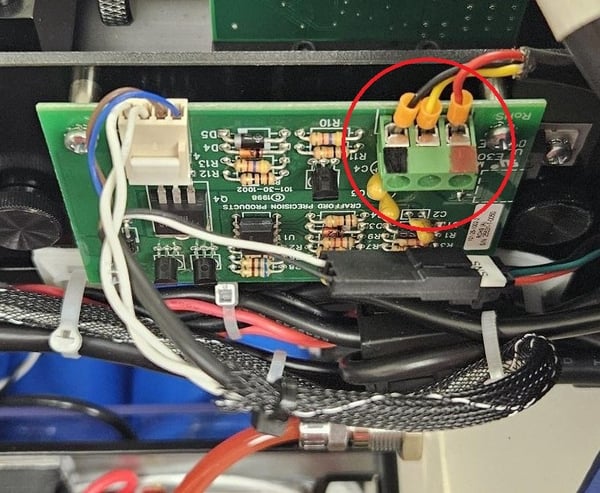
Press "Clear Faults" on the screen, and verify that the Safety Shutter opens and the message does not reappear.
If the previous steps do not resolve the issue, check that the J1 cable on the Safety Shutter PCB is properly connected. Disconnect and reconnect it, Pull on the wires to verify that they are all correctly crimped. Ensuring it is fully inserted.
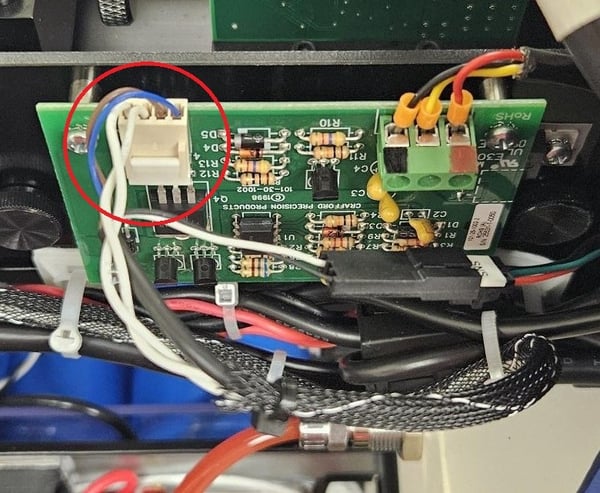
Press Clear Faults on the screen and see if the Safety Shutter opens and the message disappears.
Verify that the J20 and J21 connectors on the control board are properly connected. Disconnect and reconnect them. Finally, check with ‘Clear Fault' if the error persists.
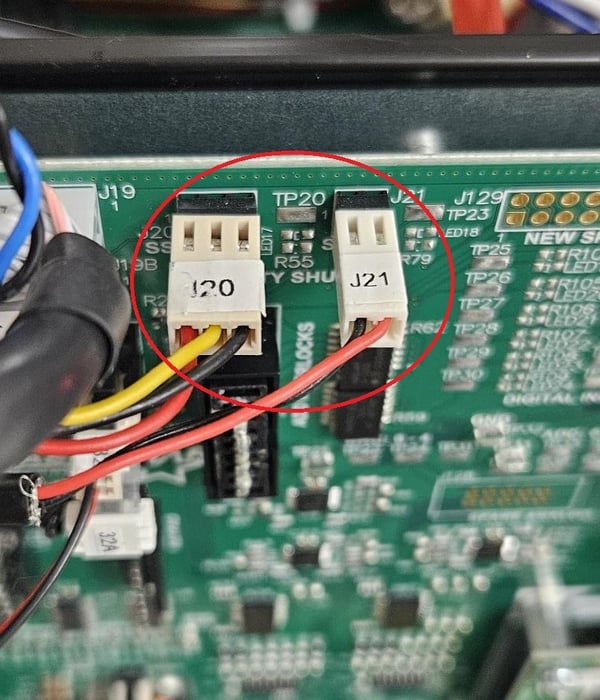
If the problem persists after these steps, the Safety Shutter or the Safety Shutter PCB may be damaged.
If, when pulling on any of the cables, you find one that comes loose from a crimp, do not attempt to repair it; contact service to order the correct cable.