![LaserStar Technologoes Logo-01.png]](https://26739.fs1.hubspotusercontent-na1.net/hub/26739/hubfs/LaserStar%20Technologoes%20Logo-01.png?height=40&name=LaserStar%20Technologoes%20Logo-01.png)
Disclaimer: The procedures described herein should be performed only by or under the supervision of specialized technicians. LaserStar is not responsible for damage to parts, equipment, or persons attempting to perform any of these procedures without proper supervision or technical assistance, proper tools, or safety measures necessary for laser, high, and low voltage handling.
The "Simmer Supply OFF" error message can have several causes. This guide walks you through various tests that can help you identify the possible cause of the error.
Tools:
- Philips head screwdriver
- Metric Hex headset
- Digital voltmeter (1000 volts DC preferred)
STEP ONE: Test the Control Board
-
Turn OFF the system
- Locate the Control Board on your machine
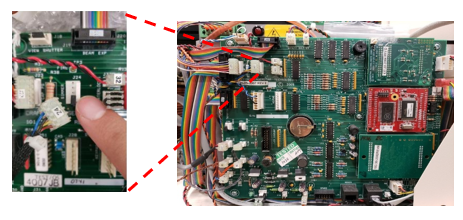
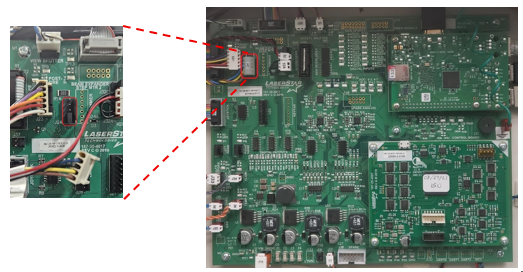
- In the Control Board, located in the upper right section, the cable is identified as J24. (See Image below)
- Remove the connector on J24, You will see 5 pins.
- With one of the two pins black Jumpers found in the Troubleshooting Service Kit, place it between Pin one and two (Counting from bottom to top), where the J24 connector was. On the control board, you will see the number "1" at J24, which indicates that J24 is Pin 1.
- Turn ON the system
- Check if the "Simmer Supply Off" Error message continues to appear on the display
- If the message continues to appear, the Control Board must be changed
G1, G2 and G3 Rabbit Core Laser’s
G4 and G5 Control Board / Carries Board-PI
STEP TWO: Check Voltage at Contacts through the Flash Lamp Chamber
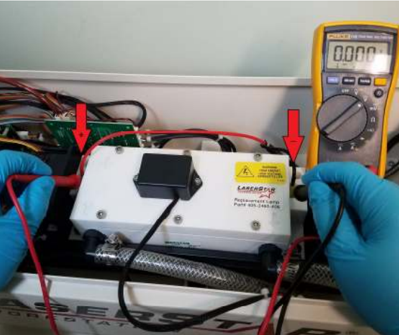
Six Screws Flash Lamp Chamber:
- Turn the system ON
- Set your voltmeter to 1000 Volts DC. NOTE: If the DC voltage range of your voltmeter does not go up to 1000 VDC, the diagnostic results may differ.
- Place the Red probe of the meter to the red wire side of the flash lamp and the black probe to the black wire side of the lamp
- Note the voltage reading on the meter
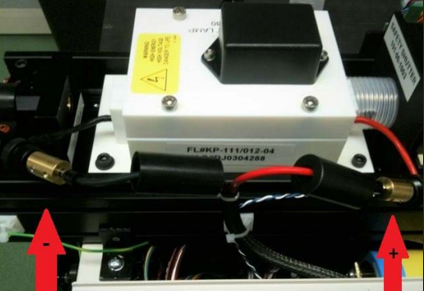
Four screws Flash Lamp Chamber (small):
-
Turn the system OFF
- Unscrew the flashlamp connector brass protector to expose the connectors (See image below)
- Turn the system ON
- Place the Red probe of the meter to the ferrule red wire side of the flash lamp and the black probe to the ferrule black wire side of the lamp
- Note the voltage reading on the meter
Laser Pump Chamber G4 and G5
-
Locate the Term Block Panel on the left side of the laser
- Test the voltage across the lamp by touching the voltmeter probes to the screws on the terminal block panel
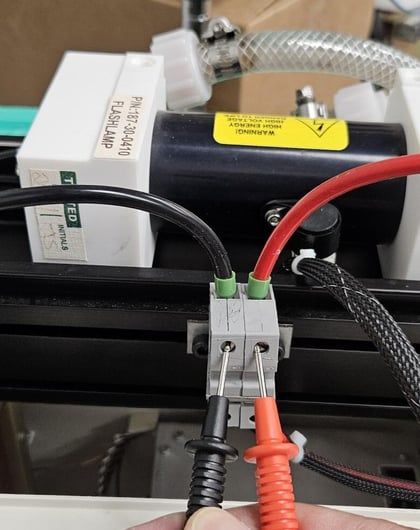
The ideal voltage should be 100 VDC ± 10 VDC.
If the voltage exceeds 900 VDC, the lamp may be the problem. Perform a visual inspection of the lamp (Step Four below). If the voltage is between 600 VDC and 700 VDC, you may hear electrical arcing. This indicates that the water is out of parameters. You must replace the water and the filter. Also, perform a visual inspection of the lamp to check its condition.
STEP THREE: Check the LED lights on the Simmer Board
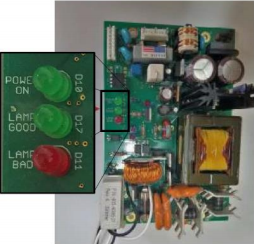
If the Laser is provided with an AC Simmer Board:
- With the system on, place the Simmer Board on the sides of the machine
- Check the LED lights that are lit on the AC Simmer Supply
- If only the Power ON of the board is on, the Simmer Supply must be replaced
- If the Power is on and the red Bad Lamp LED is on, perform a visual inspection of the lamp in step four
- If no LED is lit, check that the board is receiving AC voltage. If you are receiving AC voltage and all the LEDs are off, replace the AC Simmer Supply
If the Laser uses a DC Simmer Supply:
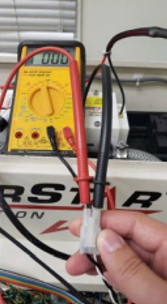
- Unplug the Trigger Transformer Quick Connector (See image below)
- Set the voltmeter to 1000VDC and place the leads in the plug on the side of the Quick Connector that goes to the Simmer Supply (black and white wires)
- First, turn ON the Main Switch (Red Switch)
- Pay attention to the voltmeter when passing the key. The voltmeter will briefly show a voltage spike. Average voltage should be ~ 250VDC
- Note the voltage reading on the meter
- If there is no voltage reading, the Simmer Supply must be replaced.
STEP FOUR: Voltage out of range 100VDC +/- 10VDC
If the voltage across the Flash Lamp Chamber is within a range of 600VDC to 750VDC, check:
- Last water and filter change. That is not more than 3 months
- If the water the customer is using is from Laserstar?
- If it is not from Laserstar, ask the Customer if they have verified the water conductivity properties.
- Compare those properties of water with Laserstar's recommendations. They must be between 0.4 and 0.75 Microsiemens / cm3
If the voltage exceeds 750 VDC, perform a visual inspection of the Flash Lamp Chamber interior.
- Turn the system OFF
- Remove the chamber white box lid (4mm Hex Key)
- Remove the two screws holding the top reflector on (2.5mm Hex Key). NOTE: If the ceramic reflectors are used, there will not be any screws
- Remove the top reflector held by the two white lips
- inspect and take a picture of the chamber inside (Lamp, contacts, reflectors)
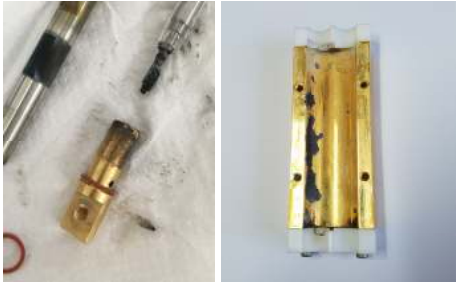
Damaged Chamber Parts
NOTE: If the laser is equipped with ceramic reflectors (Soft Touch), you must read the article "Installing Soft Touch Resonators" for instructions.
If your laser is a new-generation model (4 or 5), when the lamp inside the pump chamber is broken, current arcing can occasionally be observed at the end caps located on the sides of the pump chamber.
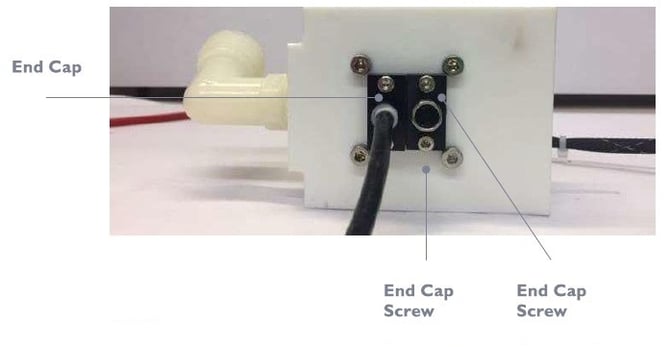
If this applies to you, please contact Service for instructions on removing the glass shards from the pump chamber. Do not disassemble the pump chamber without instructions.
STEP FIVE: Trigger Transformer Test (Generation 1,2 and 3)
- Turn the system OFF
- Remove the top cover from the Flash Lamp Chamber
- Check the Triger Transformer Height as shown in the following picture
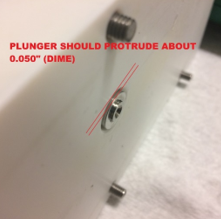
If the plunger protrusion is incorrect, please read the article "How to Adjust the Trigger Transformer Plunger" to calibrate the plunger protrusion.
- Place and secure the top cover of the flash lamp chamber
- Remove the screws from the black box on the Flash Lamp Chamber
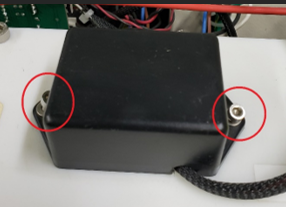
- Inspect the trigger transformer. If it appears broken or swollen, replace the trigger transformer.
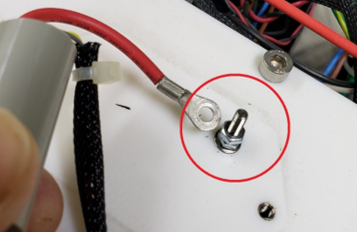
- With pliers, hold the lower nut of the screw where the red wire of the Trigger Transformer is connected, and with another pair of pliers, loosen the upper nut to disconnect the Trigger Transformer
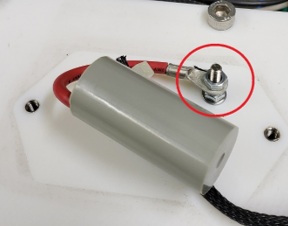
- Place the end of the cable as close to the screw as possible without touching the screw (Hold the trigger transformer, not the cable), and turn on the system. You must be aware that when turning the key, you must check if a spark occurs between the end of the cable and the screw
-
If no spark occurs, the Trigger Transformer must be replaced.
In newer laser generations, the "Simmer OFF" message often does not refer to the lamp or any other component discussed in this article. In these generations, if any component that could compromise the lamp fails, the software shuts off the Simmer Supply to prevent the lamp from turning on. The message "Simmer OFF" will be displayed on the screen. In this case, please get in touch with Customer Service for further assistance.