![LaserStar Technologoes Logo-01.png]](https://26739.fs1.hubspotusercontent-na1.net/hub/26739/hubfs/LaserStar%20Technologoes%20Logo-01.png?height=40&name=LaserStar%20Technologoes%20Logo-01.png)
Disclaimer: The procedures described herein should be performed only by or under the supervision of specialized technicians. LaserStar is not responsible for damage to parts, equipment, or persons attempting to perform any of these procedures without proper supervision or technical assistance, proper tools, or safety measures necessary for laser, high, and low voltage handling.
Tools required:
- Phillips Screw Dirver
- Voltmeter with at least 1000VDC in the scale
Depending on the generation and model of the Laser, there may be different causes for the display not to turn on. The first thing to check is if the control board is turned on. The control board manages the current that turns on the display, so if the control board doesn't turn on, then the display won't either.
Before operating the laser, it is essential to verify that the nominal input voltage matches the laser's requirements. This means checking that the voltage provided by the input outlet aligns precisely with the specifications of the laser device. Confirming this ensures the proper functioning of the laser and prevents potential damage due to incorrect voltage supply.
To identify if the control board turns on, go to the control board with the laser on and verify that the LED next to the 24VDC F15 cable is lit
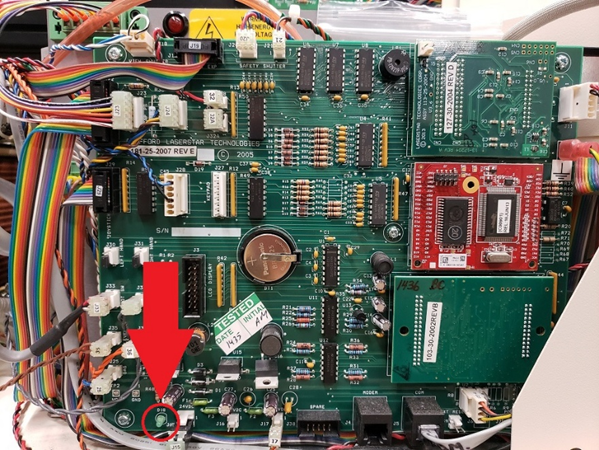
If the LED is not lit, it indicates that there is no presence of 24VDC on the control board. From this point, there are multiple causes depending on the model and generation of the Laser, for example:
- The 24VDC Power Supply Damaged
- The lasers are equipped with DC Simmer Supply. When the DC Simmer Supply is damaged and grounded, it inhibits the 24VDC as if the 24VDC Power Supply were damaged
- The control board fuse is open. When this happens, there is a short component connected to the control board
How to get started? This step applies to all models
First check if there is 24VDC reaching the cable connected on the control board identified as J15. To do this, you need to use the voltmeter.
- Two metal contacts can be seen on the J15 connector
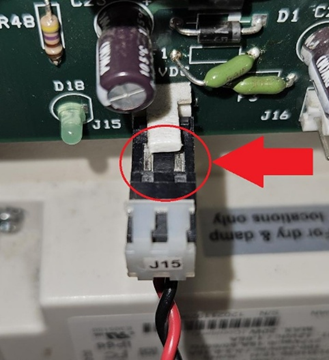
- Prepare the voltmeter. Select 200VDC on the scale
- Now, turn on the Laser, and using the voltmeter, touch the black and red testers to the metal contacts in J15
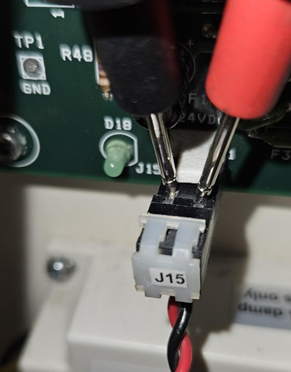
- If the D18 LED is off and the voltmeter shows the presence of 24VDC, the F1 fuse on the control board is open
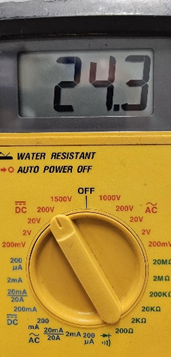
When this happens, there is a short component that is connected to the control board. The control board must be sent to service for evaluation.
If, on the other hand, there is no presence of 24VDC in J15, the 24VDC Power Supply may not be working or, if it is the case, the DC Simmer Supply went short.
Only for Lasers equipped with the DC Simmer Supply
If your Laser uses a DC Simmer Supply, the next test is to disconnect the DC Simmer Supply and turn the Laser back on to check if the control board, and therefore the display, will turn on.
- Locate the DC Simmer Supply on the Laser. Location may vary by model.
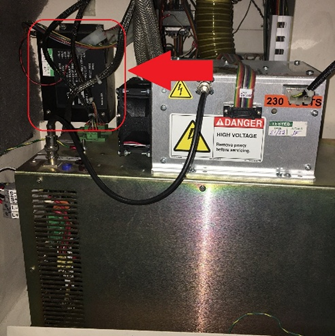
- Desconecte el Main connector del DC Simmer Supply
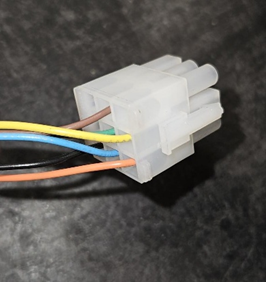
- Turn on the laser and check that the control board and display turn on.
If the control board and display turn on, the message Simmer Supply Off will appear on the display. The laser needs a new Simmer Supply.
LaserStar now has a Conversion Kit for this Simmer Supply that changes it from a DC to AC Simmer Supply. The part number for this Conversion Kit is 631-101.
You can find instructions for installing this Retrofit Kit in the article Installing an A/C Simmer Supply Retrofit Kit on the 7000/19000 series.
Now, after disconnecting the DC Simmer Supply, the control board and the display still do not turn on, the Laser needs a new 24VDC Power Supply. In this case, you need to contact Service to identify the correct Power Supply for your laser.
For Lasers equipped with the AC Simmer Supply
The AC Simmer Supply does not affect the 24VDC Power Supply as in the previous case, so you can bypass the previous test.
What can happen is that the 24VDC Power Supply is damaged or the control board fuse is open.
To check if 24VDC is reaching the control board, you must follow the same steps described in the previous case. If there is no 24VDC present in J15, check the 24VDC Power Supply.
The following should be reviewed:
- That the 24VDC Power Supply is receiving AC power
- If AC current is present, check that 24VDC is present at the output
Follow the instructions below:
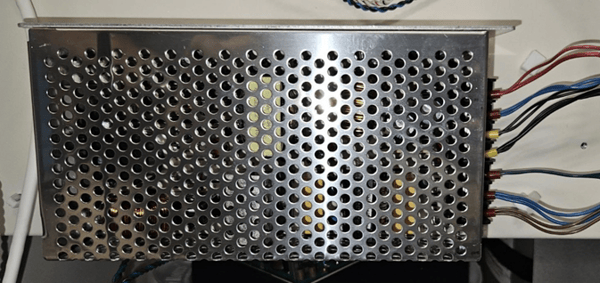
- Locate the 24VDC Power Supply in your Laser. It should look similar to this
- Turn on the laser and check if the LED light on the 24VDC Power Supply is on
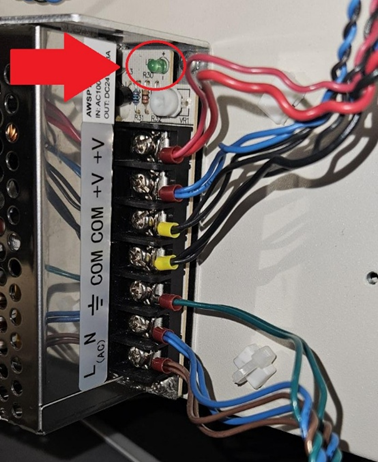
- If the LED light is not on, use the voltmeter to check if AC current is present at the input of the 24VDC Power Supply
- The voltage must be the same nominal voltage as the laser. If the laser is 120VAC, that same voltage must be present between the blue and brown wires. If the laser is 220VDC, then this will be the voltage between the same wires
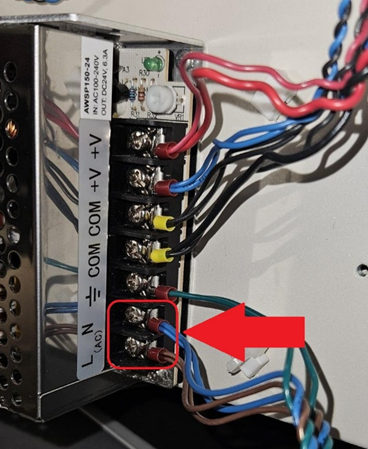
- If there is no input voltage, you should contact Service for Technical Assistance
- If the input AC voltage is correct, and the LED light is off, the laser needs a new 24VDC Power Supply
What happens if the LED light on the 24VDC Power Supply is on?
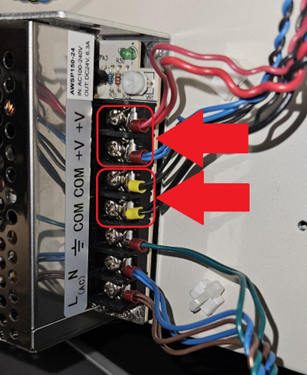
- If the LED light is on, check if there is 24VDC output on the 24VDC Power Supply
- Set the voltmeter to 200VDC and check the output of the 24VDC Power Supply between positive (V+) and negative (V-), touching one V+ and one V- at the same time with the voltmeter testers
- If 24VDC is not present, the laser requires a new 24VDC Power Supply. You must contact Service to identify the right 24VDC Poer Supply for the laser
If you are still unable to identify the problem, please contact Service for further assistance.