![LaserStar Technologoes Logo-01.png]](https://26739.fs1.hubspotusercontent-na1.net/hub/26739/hubfs/LaserStar%20Technologoes%20Logo-01.png?height=40&name=LaserStar%20Technologoes%20Logo-01.png)
Disclaimer: The procedures described herein should be performed only by or under the supervision of specialized technicians. LaserStar is not responsible for damage to parts, equipment, or persons who attempt to perform any of these procedures without proper supervision or technical assistance, proper tools, or the safety measures necessary for handling lasers and high- and low-voltage equipment.
Tools needed:
One two-pin jumper from the troubleshooting Kit
Steps
1. Jump Pins 2 and 3 of J18 on the Control Board.
2. Turn ON the Laser and check if the error goes away:
a. Yes: View Shutter Driver or View Shutter assembly bad
b. No: Control board bad
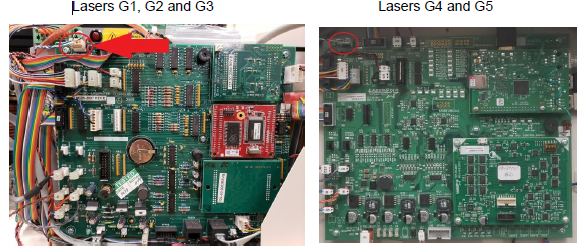
Disclaimer: Do not use the laser with a jumper installed on J18. This may cause irreversible eye damage. The jumper is used for diagnostic purposes only and must be supervised by technical personnel.
Was This Article Helpful?
Take our survey and let us know your feedback.
Still Need Help?
If you need our assistance with your issue, please contact our customer support team at (1) 888-LST-SRVC (578-7782). If you're looking for support outside of our regular business hours, please leave a voice message or send an email at service@laserstar.net