![LaserStar Technologoes Logo-01.png]](https://26739.fs1.hubspotusercontent-na1.net/hub/26739/hubfs/LaserStar%20Technologoes%20Logo-01.png?height=40&name=LaserStar%20Technologoes%20Logo-01.png)
Disclaimer: The procedures described herein should be performed only by or under the supervision of specialized technicians. LaserStar is not responsible for damage to parts, equipment, or persons attempting to perform any of these procedures without proper supervision or technical assistance, proper tools, or safety measures necessary for laser, high, and low voltage handling.
Step 1: Remove the side covers and turn the system ON. Write down if the “OK” light
Is Green or Red in the Cap Charger
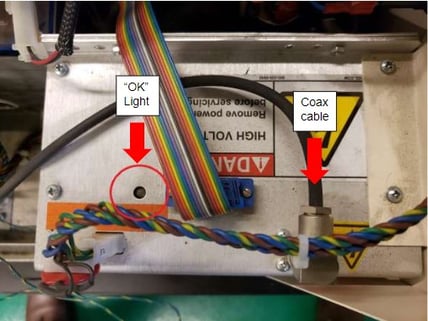
Step 2: Check if the Cap Charger fan is working. If the fan is not working, the charging capacitor needs to be replaced.
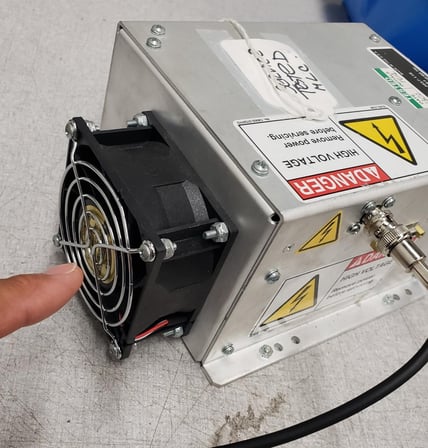
Step 3: Turn OFF the machine. Remove the Coax cable with the BNC connector. Turn the machine back on and check whether the error is still there. If not, change the Cap Charger.
Step 4: Locate the Control Board seen below
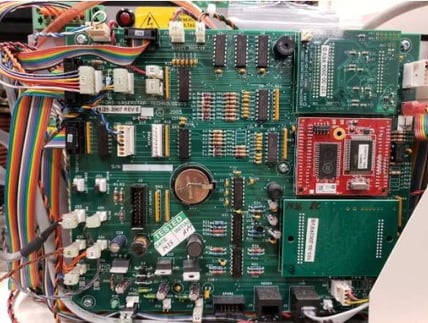
Step 5: Check that the multicolored flat cable J22 is connected correctly
Laser G1, G2 and G3
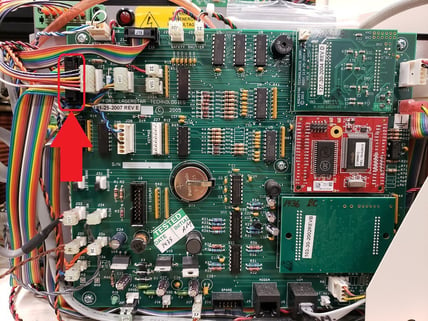
Laser G4, G5
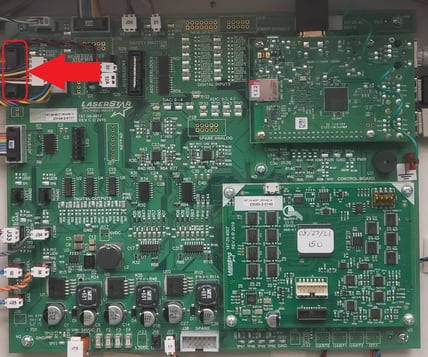
Step 6: Turn on the laser and check whether the message still appears. If the message persists, the capa charger may be malfunctioning and requires replacement.
Contact Service for additional specialist-guided tests.
Was This Article Helpful?
Take our survey and let us know your feedback.
Still Need Help?
If you need our assistance with your issue, please contact our customer support team at (1) 888-LST-SRVC (578-7782) Menu Option 3. If you're looking for support outside of our regular business hours, please leave a voice message or send an email to service@laserstar.net