![LaserStar Technologoes Logo-01.png]](https://26739.fs1.hubspotusercontent-na1.net/hub/26739/hubfs/LaserStar%20Technologoes%20Logo-01.png?height=40&name=LaserStar%20Technologoes%20Logo-01.png)
Disclaimer: The procedures described herein should be performed only by or under the supervision of specialized technicians. LaserStar is not responsible for damage to parts, equipment, or persons attempting to perform any of these procedures without proper supervision or technical assistance, proper tools, or safety measures necessary for laser, high, and low voltage handling.
Use the jumper only as a temporary troubleshooting tool. Do not operate the laser while the jumper is connected to the Control Board, including at J35. LaserStar is not responsible for damage resulting from operating the laser with the jumper installed at J35.
- Check the water bottle to ensure the water level is adequate.
- If needed, add water until it reaches the proper level.
- Turn ON the laser and check if the warning message disappears.
- If the message persists:
- Turn OFF the laser.
- Locate Jumper J35 (Level) on the Control Board.
G1, G2, G3 Control Board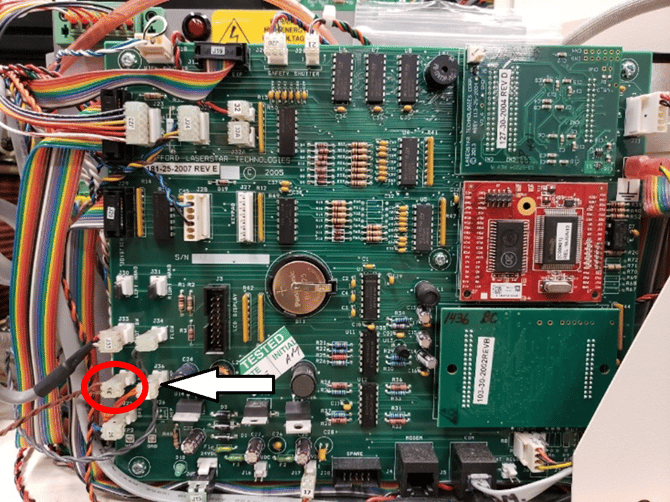
G4, G5 Control Board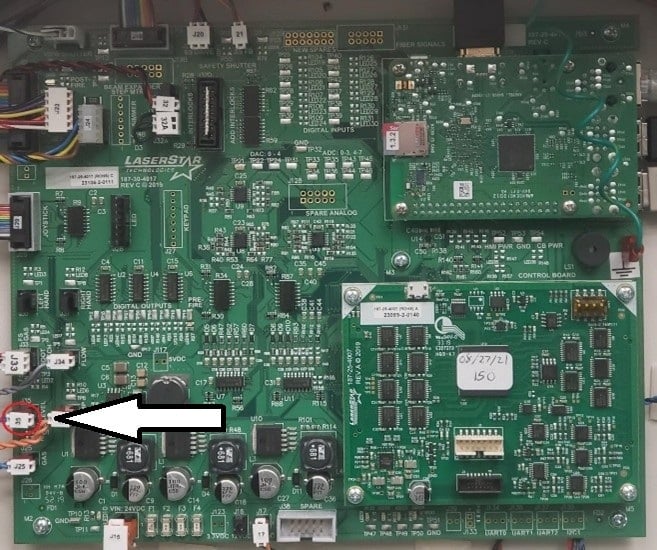
Find the Troubleshooting Kit Jumpers.
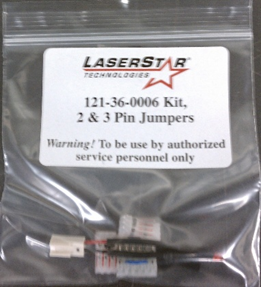
- Take one black two-pin jumper cap.
- Disconnect the cable at J35 and place the jumper cap on the pins.
- Turn the laser ON again and check whether the message appears. If the message appears, the Control Board is faulty and needs to be replaced.
If the message does not appear with the jumper in J35, the level sensor in the water container is damaged. The laser requires a new water container. You must contact Customer Service to determine the correct water container for your laser. Certain information is required to identify the correct part.
This Article Helpful?
Please take our survey and share your feedback.
Do you still need help?
If you need our assistance with your issue, please contact our customer support team at (1) 888-LST-SRVC (578-7782). If you're looking for support outside of our regular business hours, please leave a voice message or send an email to service@laserstar.net